
 English
 العربية


Resolver feedback cables as shown in Table 3-13 are available from GE Fanuc for the S2K Series resolver-based controllers used with MTR-Series motors. Plug the motor end of the resolver cable into the connector on the motor and the DB-type connector end of the cable into the DB-15 socket labeled Position Feedback on the front of the controller. The best system reliability is achieved when the encoder cable is returned in a separate conduit from that housing the motor power cable. The feedback cable should use 24-28 AWG twisted pair wire and must be shielded. The shields must be terminated to the isolated ground pins on the Position Feedback (DB-15) connector on the S2K controller as shown in Table 3-9. The maximum cable length for resolver feedback cables is 50 meters. See Section 3.6.10, Connection Diagrams, for additional wiring detail.
Serial Port Wiring
The S2K controller includes an RS-232 serial port that is used for programming and monitoring functions in addition to providing an interface for an Operator Interface Terminal. While the Motion Developer software uses normal ASCII communications, the S2K controllers also support an RTU protocol on this port allowing communication with any RTU-compliant OIT or device (see Chapter 9, “Using Serial Communications” for more details). The RTU register is used to enable/disable the RTU mode. A +12 VDC supply is available on pin 4 that can be used to power the display. This supply is also available on the I/O connector and can source a maximum of 0.5 amp combined load current.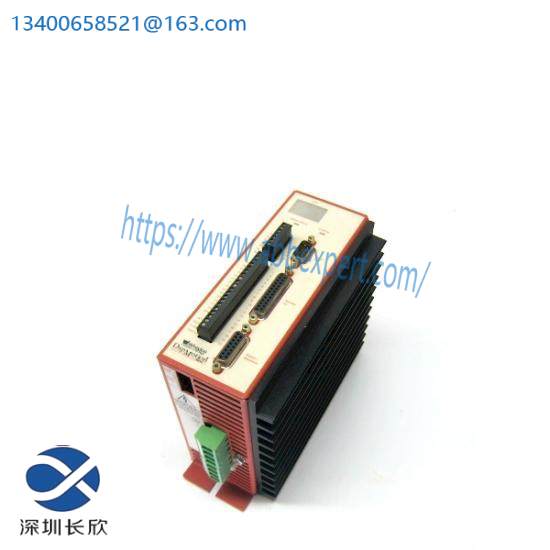
Default settings for the serial port are 9,600 baud, 7 bits and odd parity. XON/XOFF flow control is used.
Prefabricated serial cables are available from GE Fanuc as part number IC800SKCS030 (3 meters) or you can build your own cable using the following S2K connection information. Cable should be Belden 8723 shielded cable or equivalent. To meet the requirements of EN61000-4-5 and CE mark, serial communication cables shall be shielded and shall not exceed 30 meters in length. Pin-out for the serial cable is shown in the following table.
Discrete I/O Wiring
The discrete inputs and outputs may be wired for either sinking or sourcing operation. The operational voltage range is 12 to 24 volts DC. The outputs can sink or source 100 mA maximum. The connection diagrams in Section 3.6.10 show proper connection for sourcing and sinking configurations. Points labeled as “IN_xx” are inputs only while points labeled “I/O_xx” can be used as either inputs or outputs.
The wiring to this connector should be of appropriate size and insulation quality for the application. To meet the requirements of EN61000-4-5 and CE mark, discrete I/O cables shall be shielded and shall not exceed 30 meters in length.
The discrete I/O are general purpose except for the Enable Input and the OK output. Three of the other general purpose inputs are used to connect a home switch and hardware overtravel switches when required by the application.
Connecting Homing and Overtravel Switch Inputs
Many applications require the use of a home position sensor to define the reference or “home” position of the axis. The S2K controllers have a number of home reference commands that can be used to home the axis to various reference points such as the encoder marker (RMF, RMR), a home switch (RHF, RHR) and the overtravel switches (ROF, ROR). When a home sensor is used, it must be wired to the Discrete Input 1 (DI1) terminal. When the controller executes one of the Run To Home Input commands (RHF, RHR), it will look for a state change on this physical input.
When the controller executes a Home To Overtravel Input command (ROF, ROR), it will look for a state change on the respective overtravel switch. The forward overtravel switch must be connected to Discrete Input 2 (DI2), and the reverse overtravel switch must be connected to Discrete Input 3 (DI3). To use these end-of-travel switches as a home sensor, it is not necessary to have the hardware overtravel inputs enabled (OTE=1). However, if the application requires end-of-travel protection, you must enable the hardware overtravel inputs by setting the Overtravel Enable register true (OTE=1).
Connecting Handwheel Encoder Inputs
The controller has a special function that enables the connection of a handwheel encoder, typically used to jog the axis at a low speed, to two of the discrete inputs. When the Handwheel Enable register is set to true (HWE=1), Discrete Input 5 (DI5) is used to connect the A-channel of the handwheel, and Discrete Input 6 (DI6) is used to connect the B-channel. The handwheel encoder inputs are limited to a maximum pulse rate of 500 pulses/second. The axis will follow the handwheel input based on the values of the Gearing Ratio Numerator (GRN) and Gearing Ratio Denominator (GRD) as shown below:
This additional encoder input can be used as a master source, within the maximum pulse rate limitation stated above, when the auxiliary encoder input is used for dual loop servo control.
Auxiliary I/O Wiring and Functional Descriptions
The Auxiliary I/O connector includes a number of diverse signals used to interface the S2K controller to your motion controller and machine. The functions available include:
• Analog Command Input (AI1)
• Analog Output (AO)
• +5 Vdc Output (for auxiliary encoder) (on the Pulse Input on SSI216, SSI228, & SSI420 models)
• +12 Vdc Output (for Enable input)
• Enable Input
• OK Output
• Encoder Output
• Auxiliary Encoder Input (on the Pulse Input on SSI216, SSI228, & SSI420 models)
The SSI216, SSI228, & SSI420 models have a different configuration for the Discrete I/O and Auxiliary I/O connections as shown on the connection diagrams in Section 3.6.10.
The Enable input and OK output may be wired for either sinking or sourcing operation. The operational voltage range is 12 to 24 volts DC. The OK output can sink or source 100 mA maximum. The wiring to the Auxiliary I/O connector should be of appropriate size and insulation quality for the application. To meet the requirements of EN61000-4-5 and CE mark, Auxiliary I/O cables shall be shielded and shall not exceed 30 meters in length.
SI105, SSI104, SSI107 and SSI407 Models
The Auxiliary I/O connector on these models is a standard 25-pin female D-shell connector and is wired according to the pin-out shown in Table 3-11 and in section 3.6.10, Connection Diagrams, for the 4.3 and 7.2 amp servo controller models and 5 amp stepper controller model.
GE Fanuc offers prefabricated connection options for the Auxiliary I/O signals:
A breakout terminal board assembly (44A726268-001) and associated “plug-and-go” interface cables (IC800SKCIxxx) make all of the signals available on screw terminals from a compact terminal block that can be panel or DIN-rail mounted.
Flying lead cables (IC800SKCFLYxxx) have a connector on one end and marked, stripped wires on the other end. The stripped ends can be wired to a user-supplied terminal strip or to the machine controller’s terminal strip. Each wire on the stripped end is marked with the pin number it connects to on the connector end.
Related product recommendations:
GE IC694ALG392A
GE DS200KLDBG1ABC
GE FANUC IC754VSF12CTD Quick Panel Control
GE DS3800HRDB1
GE Fanuc F650BABF2G1HI
GE IS200BICLH1AEC
GE IS200RCSAG1A
GE IC693MDL330
GE IC693MDL654F
GE 996D957G3 & 996D956-0
GE IC660EBA023
GE FANUC IC200PNS001
More……
Leave a comment
Your email address will not be published. Required fields are marked *